I Built 5 Apps for 2 Hackathons in 4 Weeks And I realized we're living in the Personal Software era.

Steve Oak (Okkar Kyaw)
Prefer Audio Experience? Listen below 👇
After wrapping up the SOKK project where I explored RAG and knowledge graphs, I remember using Figma Make one night to speed up my frontend work. That got me thinking - how fast can I actually push out quality experiences while shipping solutions within constraints?
I wanted to ramp up even further. Test my limits. See what's possible when you combine curiosity with the right tools.
Discovering the Hackathons
At the right time, I accidentally stumbled upon Craft Docs. They have millions of users worldwide, and they were running a winter hackathon with weekly winners. Around the same time, I saw YouWare (an SF startup building a vibe coding platform) was hosting their own challenge.
So I decided to join both. Just for fun.
1. Craftie Essence
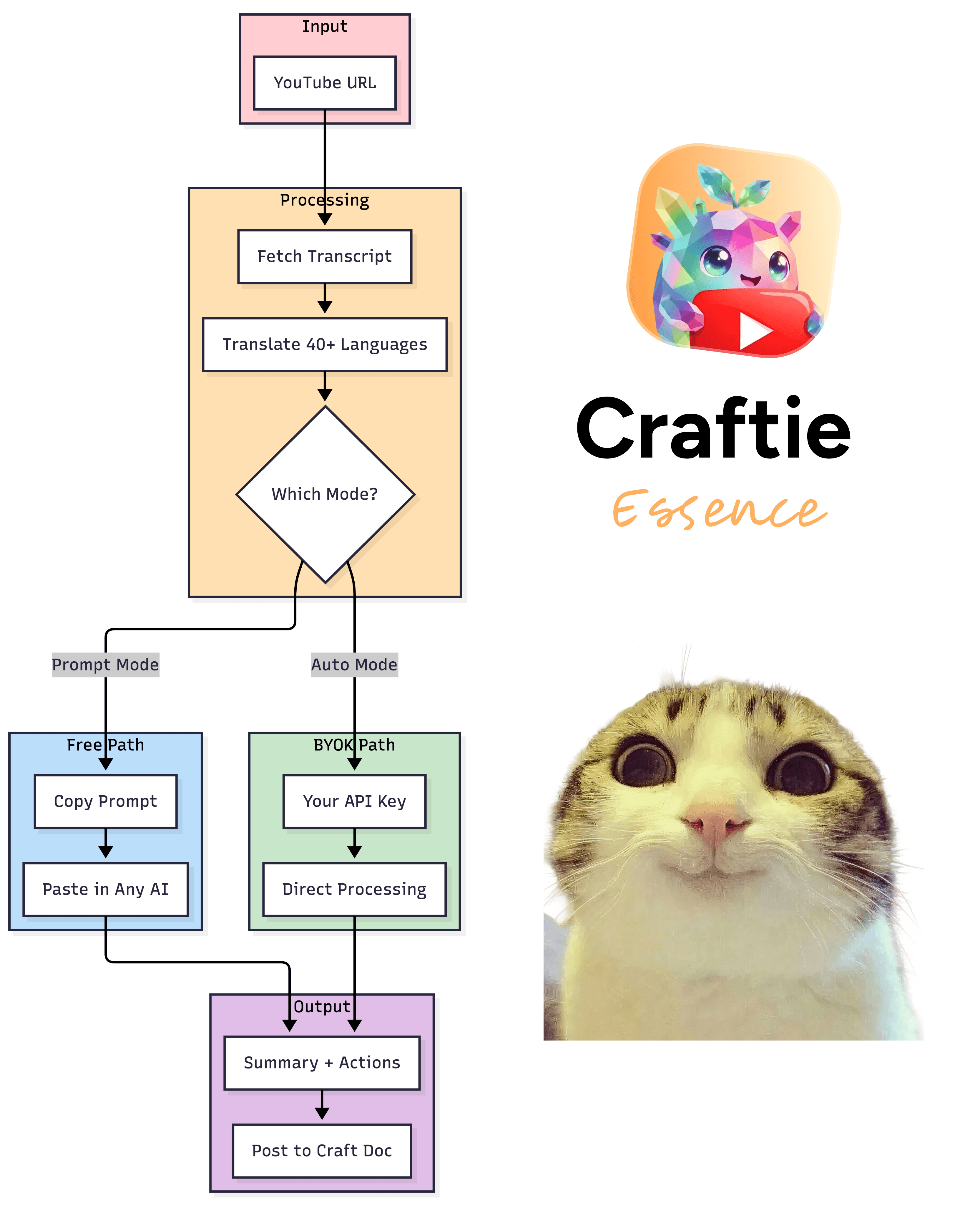
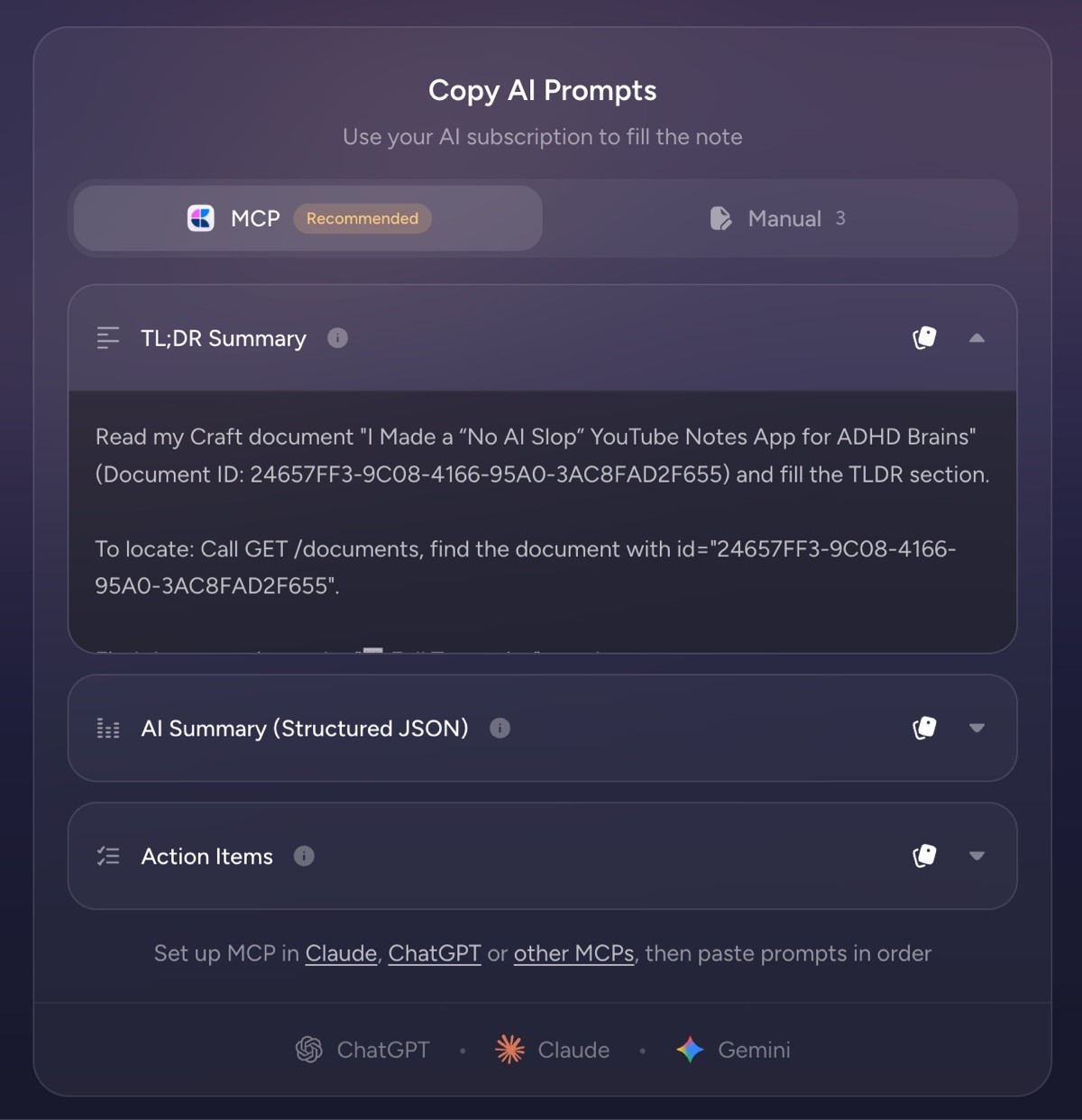
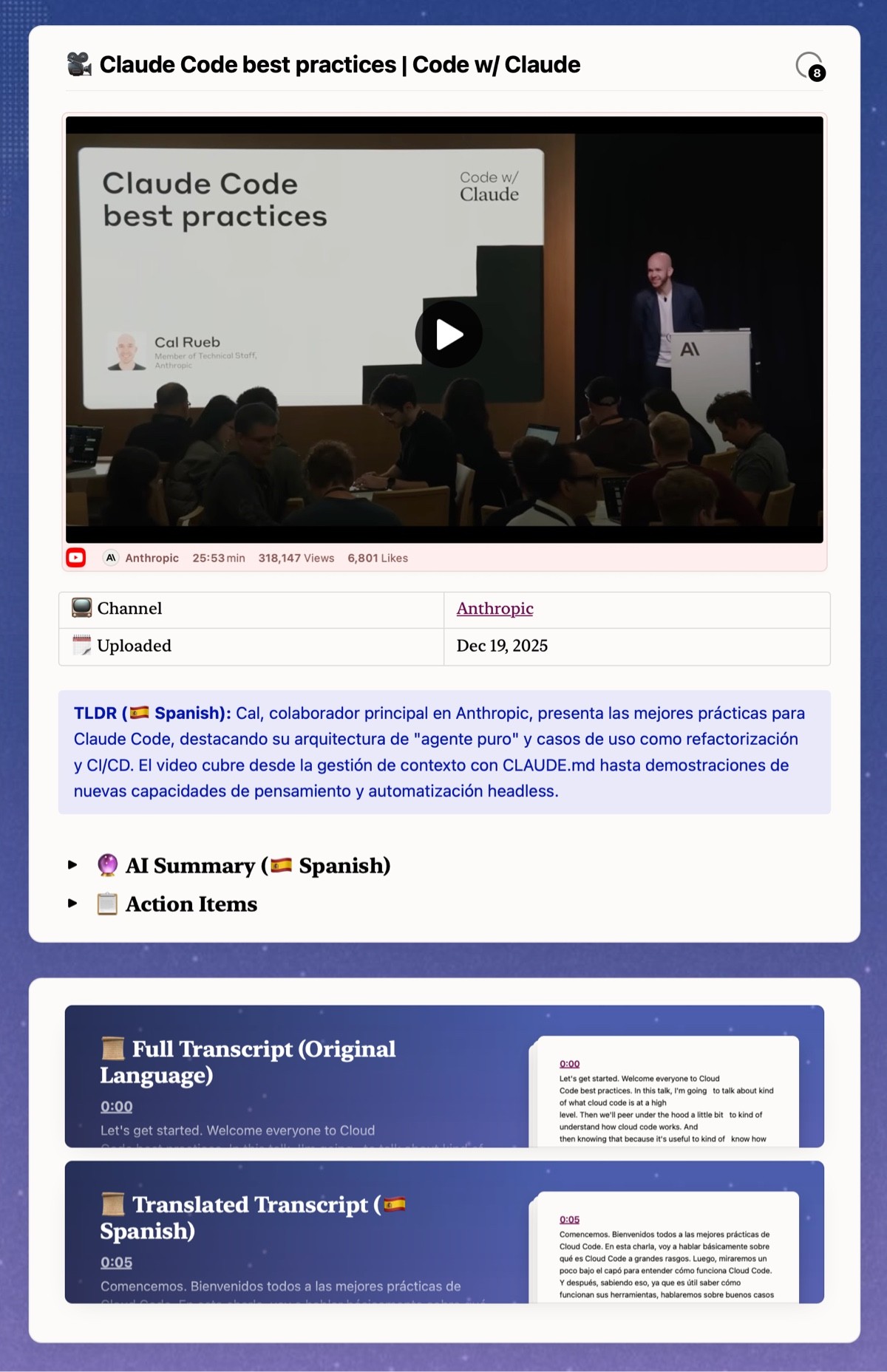
A YouTube transcription and translation app that generates action lists, main points, and AI summaries. Works with or without bringing your own AI key (BYOK).
What It Does
It's deeply integrated with Craft and built specifically for Craft users. No database needed. Everything stays local.
Feature | What It Does |
|---|---|
YouTube Transcription | Pulls video transcripts automatically |
Multi-language Translation | Supports 40+ languages |
AI Summary | Generates TL;DR with streaming progress |
Action Items | Extracts tasks from video content |
Prompt Mode | Free tier - copy prompt to use in any AI |
Auto Mode | BYOK tier - direct processing with your API key |
Craft Integration | Posts directly to your Craft documents |
The "Achieve More" Insight
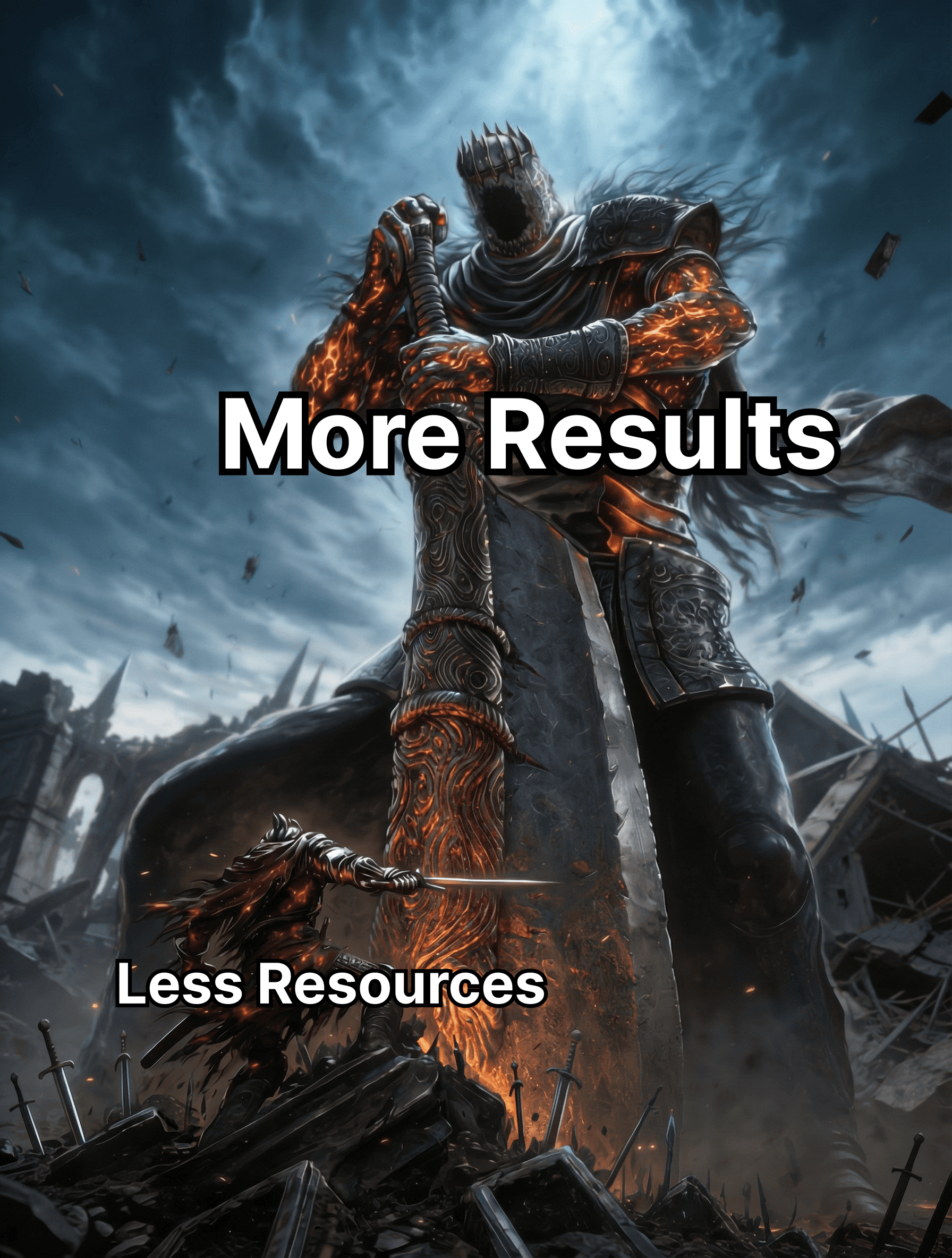
Here's something that clicked for me while building this. Everyone talks about AI helping us achieve the same with fewer resources. But what about achieving more with the same resources?
That question shaped how I approached this project.
Heavy on Motion and Interaction
I focused on interactions, motions, and animations to see how fast I could create a complete visual experience. The whole app starts with a loading state. When you click, everything morphs into the app and the title flows into the hero section.
The Win
Expecting nothing much but happy with the results and learnings, I got selected as a Complex Prize winner. The judges mentioned it was "fun and well-thought-through" and "extra fun and timely."
I used that prize money to invest more in keeping up with AI, agents, and advancements in design and development.
Some Highlights


The AI Tooling Journey
This period is where I explored and experimented way more than just Cursor and Claude. On top of working on these projects, I tried out:
Tool | What I Learned |
|---|---|
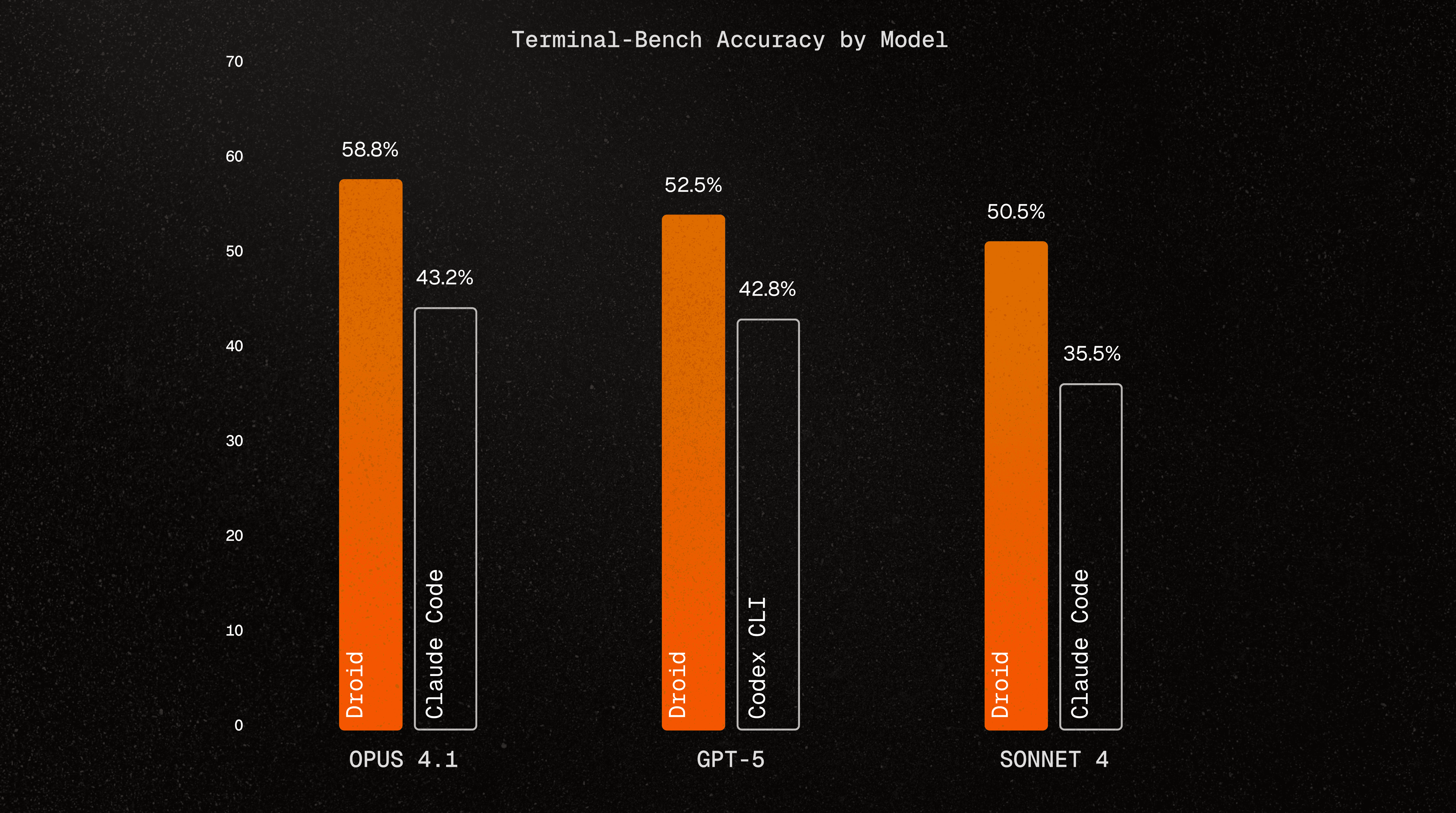
Factory Droid | The "Infinite Context Engine" - sounds like marketing, but the hype matched the experience. Never had to worry about memory or context. Ranked #1 in terminal benchmarks. |
WARP Terminal | Modern terminal experience, good vibes |
GLM 4.6-4.7 | Chinese LLM (Affordable Claude alternative) |
Gemini | Multimodal generation and understanding |
Codex | Deep analysis capabilities |
People kept recommending Factory Droid. The infinite context thing intrigued me most. It delivered.
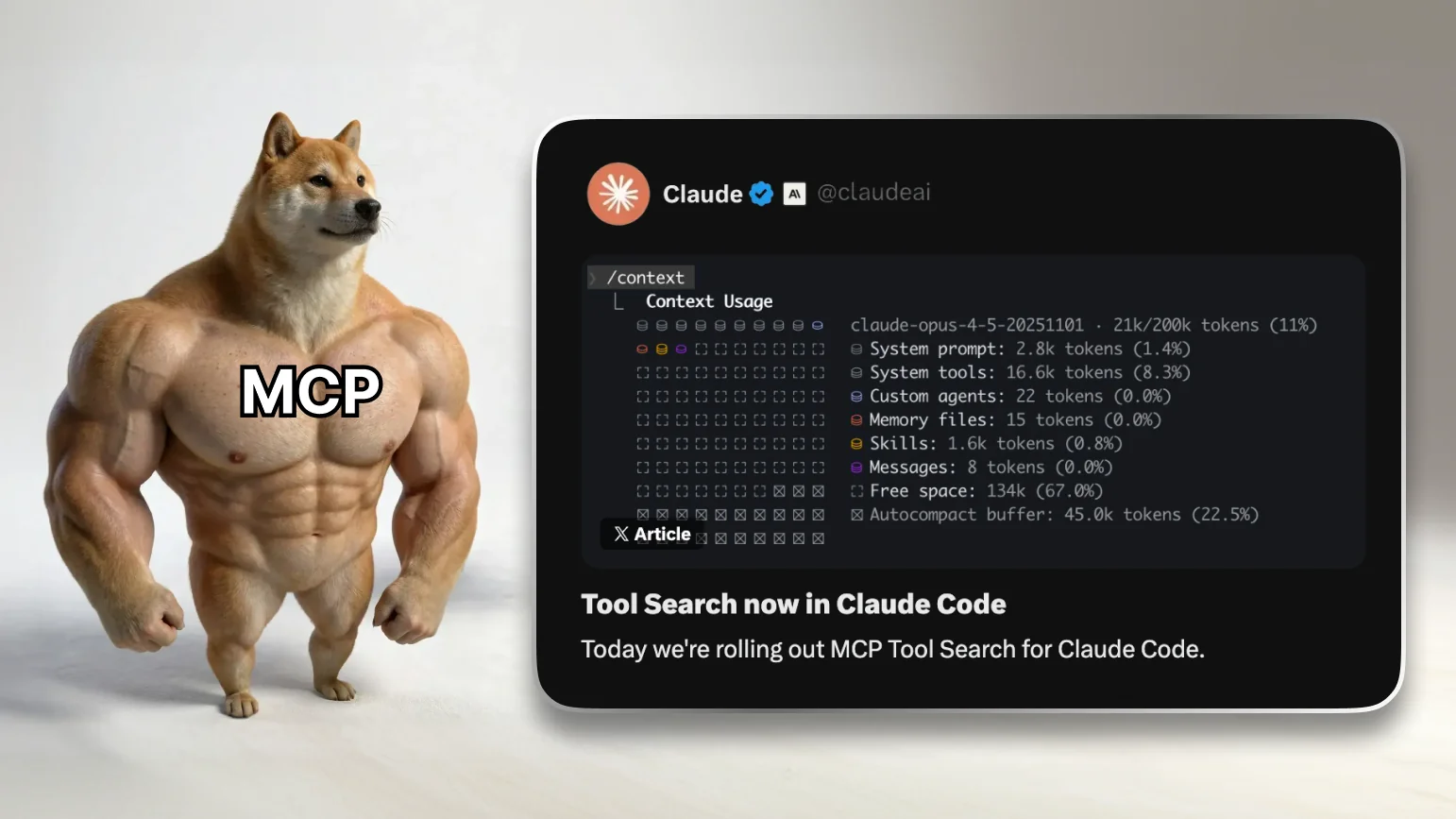
But as I'm writing this case study in January 2026, I've switched back to Claude Code. It now supports MCP search tools, has a Chrome Extension, and Interview Mode. I still don't understand why other CLI competitors aren't implementing these features when they already have the foundations. When I use other tools, I have to use my own interview MCP tool which I'll share with everyone later.
2. Craftie Clarity
A hybrid Calendar and Kanban app for Craft. Nothing groundbreaking on paper, but it was one of the most requested features by Craft users. I'd been wanting to build something like this since I started using Notion back in 2019.
What It Does
Feature | Description |
|---|---|
Calendar View | Full schedule view with a gold accent theme |
Kanban Board | Drag-and-drop task columns |
Tab Switching | Horizontal camera-pan transitions between views |
Daily Brief | Quick view popover from the bottom nav |
Collection Filter | Filter tasks by Craft collection |

The tab switching uses horizontal camera-pan transitions. When you switch from Calendar to Board, it feels like the camera is panning across a physical space. Small detail, but it makes navigation feel spatial rather than just swapping screens.
This project later became the foundation for YouSoul.
3. Craftie Import Extension
A web clipper with media snapshot features and AI-assisted extraction.
Why Extensions?
This is where I got the idea about developing extensions. You've got more control and freedom with extensions, plus widespread access compared to standalone apps. So I decided to try building something useful for Craft users.
The Signal-Based Approach
Most web clippers route content based on what type of page you're on - recipe pages get the recipe handler, event pages get the event handler. But that breaks when content doesn't fit neat categories.
I took a different approach: signal-based extraction.
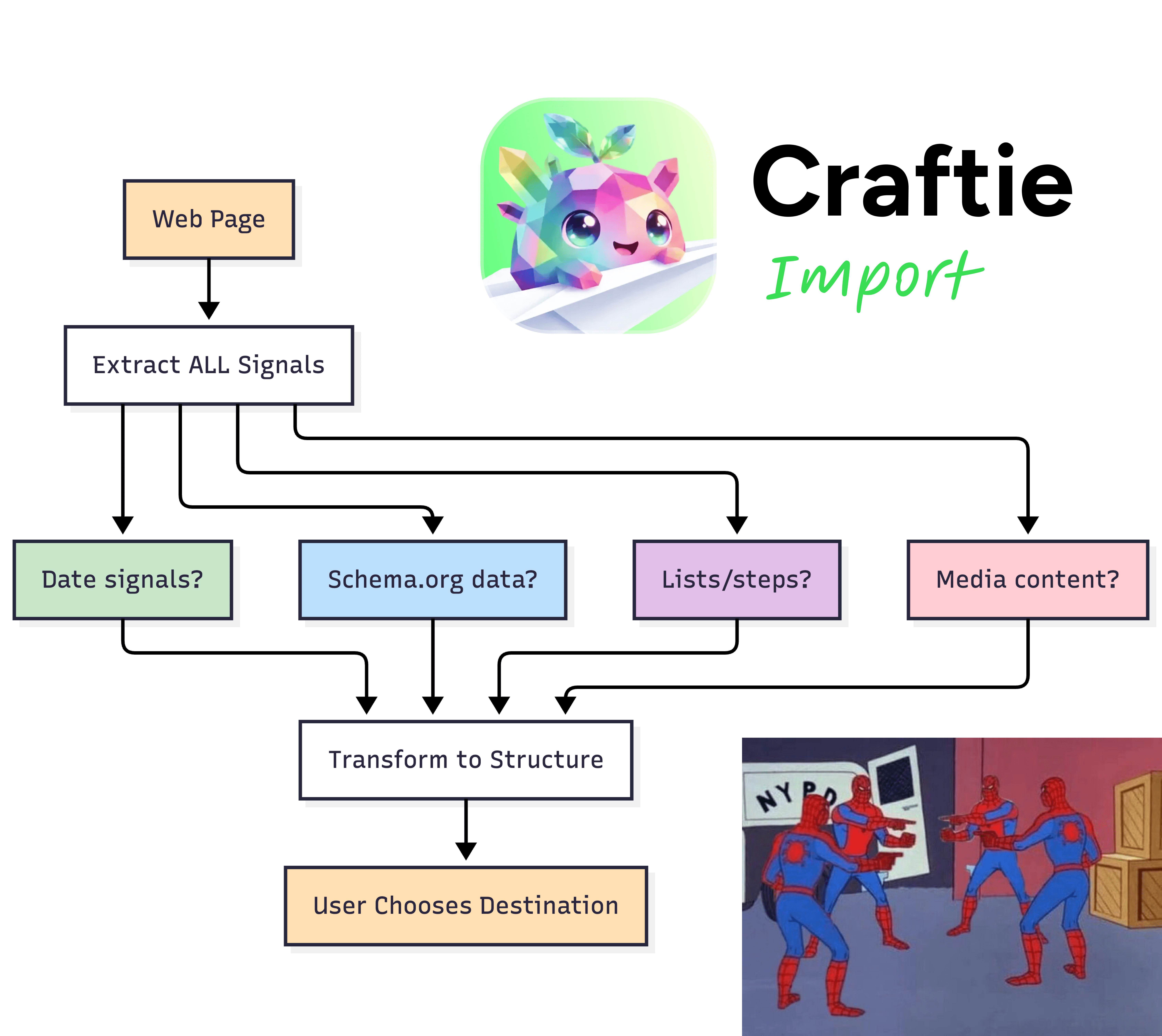
Instead of asking "what type of page is this?", I ask "what signals does this page have?" Then the user picks where it goes:
Destination | What It Does |
|---|---|
Document | Full content with formatting |
Daily Note | Quick capture to today's note |
Task | Action item with optional schedule |
Collection | Schema-driven structured data |
4. Craftie Mail
Gmail to Craft Tasks & Daily Notes integration with AI insights. Also tailored specifically for Craft users.
The Three AI Modes
Mode | How It Works | Cost |
|---|---|---|
MCP Prompt | App generates prompt → paste in Claude with Craft MCP → AI creates tasks directly | Free |
Manual Prompt | Copy prompt → paste in any AI → copy response → paste back | Free |
Auto BYOK | One-click processing with your API key | ~$0.01/use |
The Commitment Tracker

Here's what makes it different from other email-to-task apps: it scans your SENT emails for promises you made.
Most tools look at received emails for things others want you to do. What about "I'll send that by Friday" or "Let me follow up next week"? Those commitments get lost.
Same pattern that Discord Coach used to win a Grand Prize in an earlier hackathon. "What did I promise?" is a different question than "What do I need to do?"
5. YouSoul Vibe Productivity System
This was for a different hackathon, YouWare, the vibe coding platform. I downloaded the foundation from Craftie Clarity, used Claude Code mostly for development, did some workarounds, and hosted it there.
Why Build This?
I've been wanting to create agentic features for productivity for a while. Now there are agentic features in Notion, Gemini, and others. But most are just GPT-wrapped chats. That's not enough anymore.
So I built this to be importable from any other platform, with all the Calendar and Kanban features you'd expect.
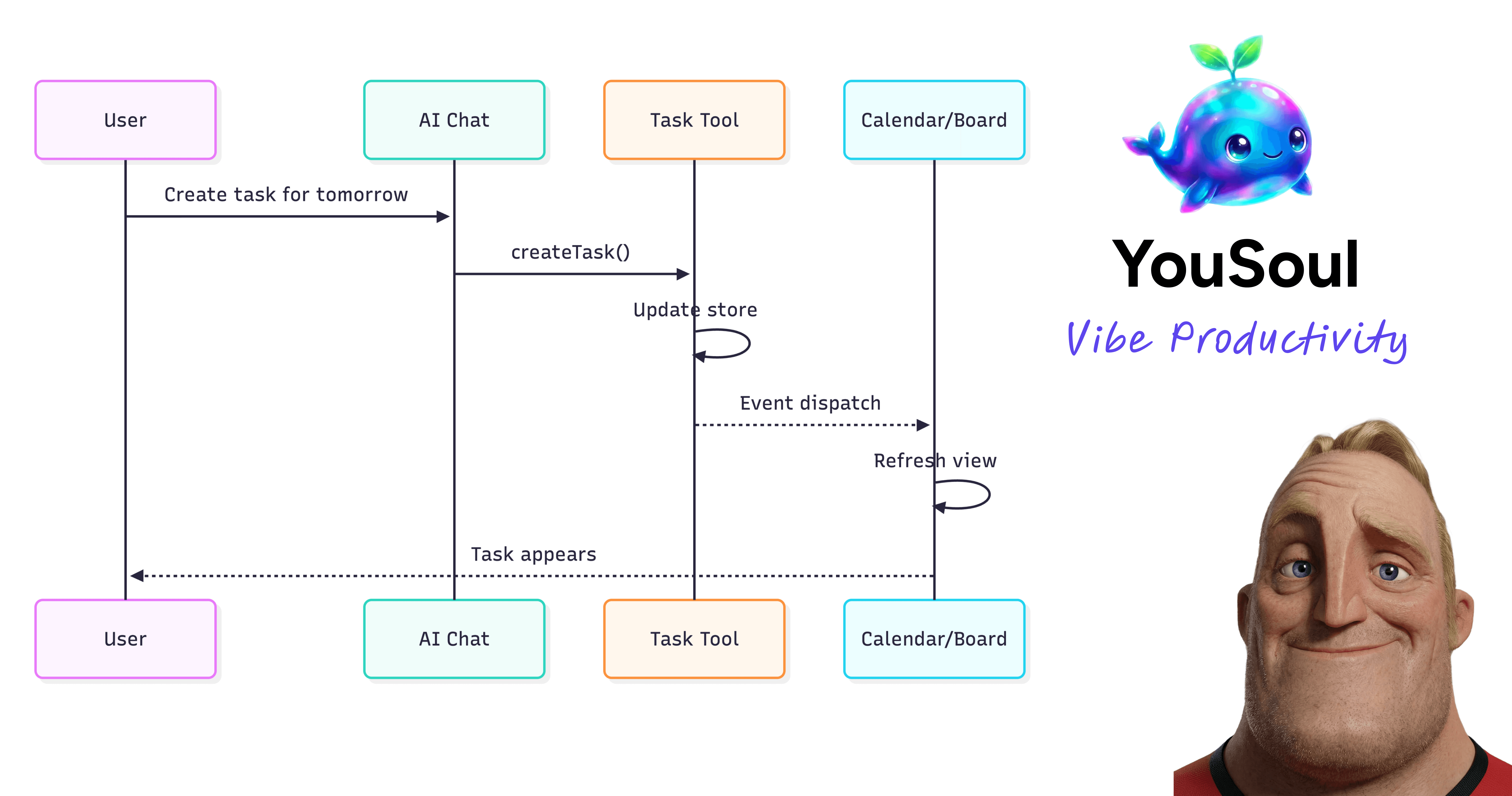
The key difference from other AI productivity tools: event-based sync that actually updates the UI in real-time when AI creates or modifies tasks. Plus mood correlation and pattern insights across 73 designed features.
The Bigger Picture
Now I built all of these in just 4 weeks during my free time.
What does that mean?
We can build almost everything we have in mind now. Productivity and speed have gone through the roof. Human curiosity and innovation keep surprising me.

There's always paid and open source projects and updates popping up almost every day.
For example, as I write this, Clawdbot/MoltBot/OpenClaw is the most trending tool. I bought a Mac Mini to boost my productivity and already have workflows running for my personal and professional life.

On Energy Usage
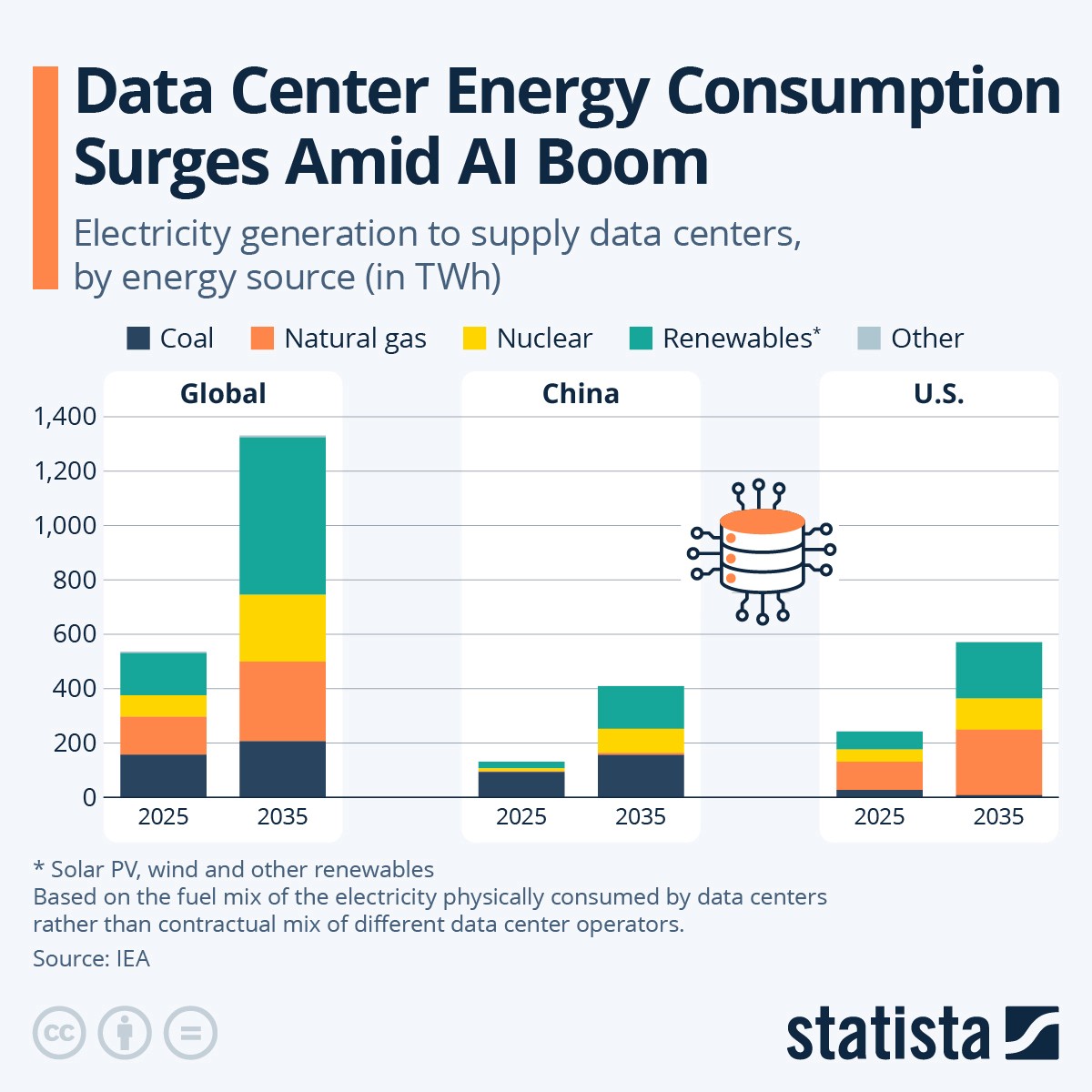
Everything has pros and cons. People are complaining about AI causing energy usage spikes and hardware demand. But I'm on the positive side. I think we'll figure it out somehow. We always do.
The Personal Software Era
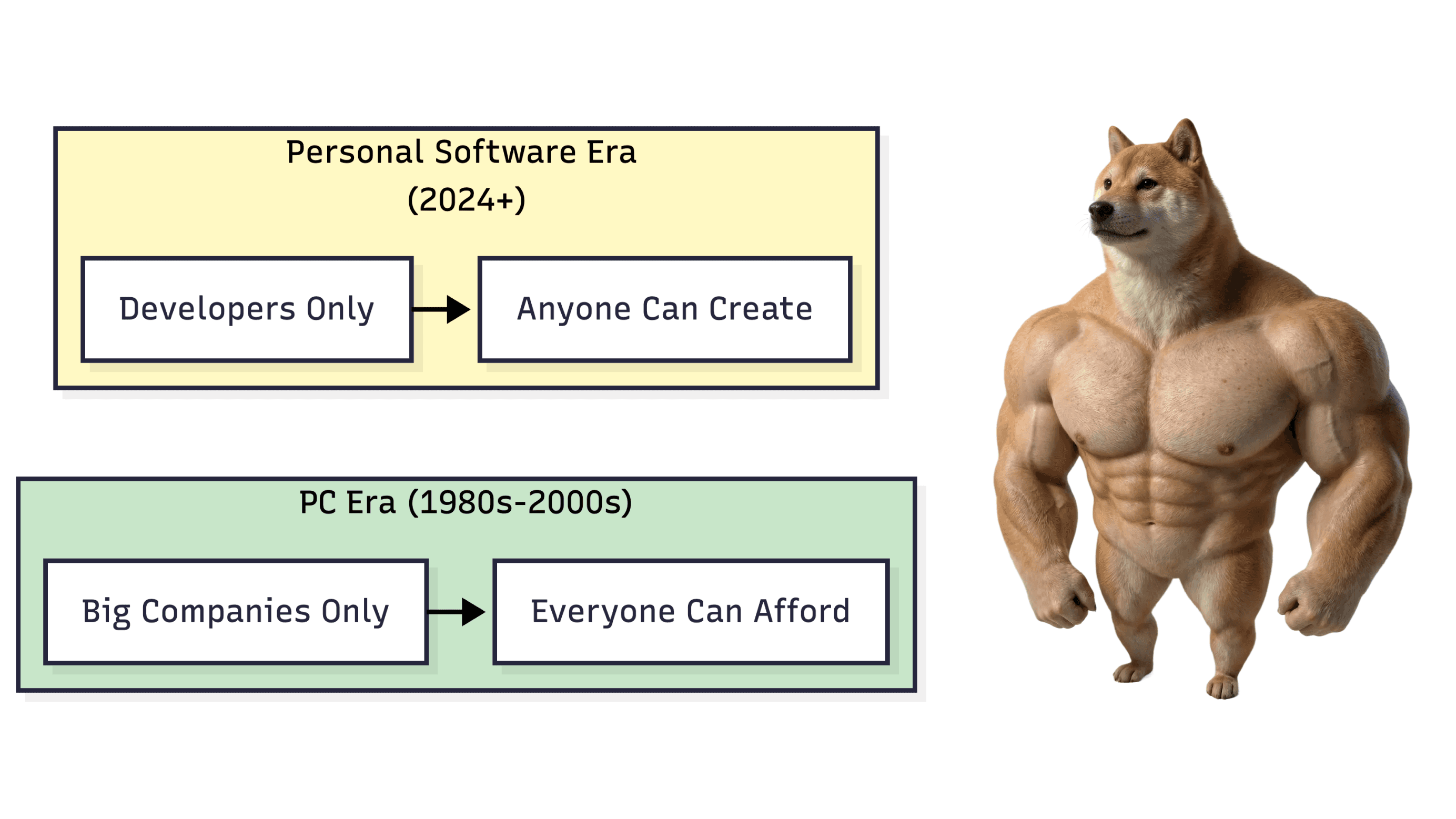
Think about this: history repeats for the better.
Back in the days, only big companies had those expensive computers. Then the PC era came. Everyone could afford a computer and enjoy their potential.
Now it's time for PS: personal software.
People are already creating their own daily life apps and systems for themselves, their friends, and small groups.
This is our moment!
" height="27.75px" id="uLviGCnmH" width="32.250290101110345px"/></svg>)
" height="30.750000122616527px" id="vGhZKbMSS" width="30.75px"/></svg>)
" height="30.750000122616527px" id="TPi0p5D9h" width="30.75px"/></svg>)
" height="30.750000122616527px" id="fXIphKa5h" width="30.75px"/></svg>)